

During an online webinar in June, Bjorn Sjodin, senior vice president of product management at COMSOL, talked about AI-assisted simulation and agentic workflows with Rui Aguiar, CEO of Cosmon, a software company that has developed cutting-edge AI agents for mechanical engineering. In particular, they discussed the way AI works in the COMSOL Multiphysics® software via the functionality of the Chatbot window and Cosmon’s AI agent. One guiding question framed the discussion: How can engineers use AI chatbots and agents to support development processes?
What Is Agentic AI?
Before diving into the discussion, let’s clarify the distinction between a couple of commonly used AI technologies:
- Large language model (LLM) copilots, or chatbots, are conversational AI tools that can answer questions, summarize information, generate code or text, and help users interpret or apply information based on prompts. As they require human input, they are not agentic.
- AI agents, on the other hand, are goal-oriented systems that can use tools and carry out multistep workflows, evaluating intermediate results and adjusting their approach as needed, with or without human input.
How Can Users Integrate AI into Modeling Workflows in COMSOL Multiphysics®?
Sjodin began the webinar by discussing how users of COMSOL Multiphysics® can utilize AI in their workflows thanks to the software’s powerful Java-based API, which enables communication with third-party LLMs.
The Chatbot Window
To provide LLM copilot functionality, the COMSOL Desktop® UI includes the Chatbot window. Through the Chatbot window, users can connect directly to an LLM — such as GPT-5™, DeepSeek™, Google Gemini™, or an on-premise LLM — to ask modeling questions and/or enter prompts to have the LLM generate and debug code. Code generated in the Chatbot window can then be run in the Java Shell window to apply changes to a model.
To determine which type of response you would like the chatbot to return, the Chatbot window provides three distinct subject options: General, Programming, and Modeling, each of which allows for more customized answers. For example, if you select the Modeling subject, the LLM will answer with guidance in text form, accessed from model information, guides, and relevant provided documentation, whereas if you select the Programming subject, the LLM will output Java API code.
In the webinar, Sjodin showed an example of how to use the Chatbot window to ask a specific question about modeling a pretensioned bolt with a gasket, using a deliberately broad prompt: “How can I reduce the risk for leakage in this design?”
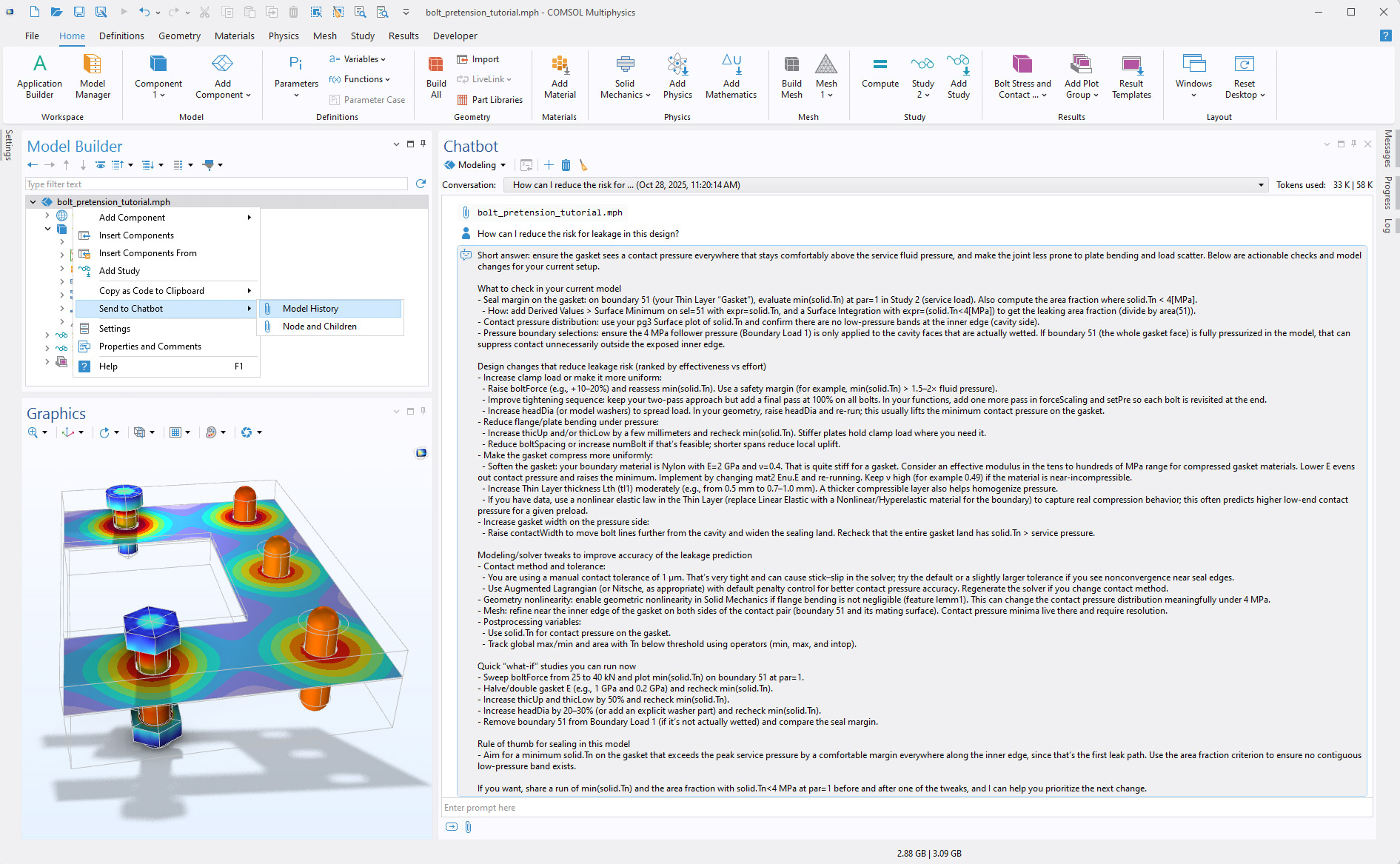 The Chatbot window providing guidance on gasket leakage after an entire model was attached as context.
Sjodin attached a model by selecting the Send to Chatbot option in the Model Builder and added some supporting screenshots, and the LLM was able to provide a detailed response that referenced specific geometric entities and variables in the model. Its response suggested ways to evaluate and improve the design, including checking gasket compression, contact pressure, bolt preload, material stiffness, and pressure boundary conditions. Sjodin noted that the response was reviewed by COMSOL’s structural mechanics engineers, who found it to be a very strong answer.
For more information on the Chatbot window and what it can do, check out the following Learning Center article and blog post.
AI Agents
Sjodin also explained that you can download an AI agent (typically to the same computer where you are running COMSOL Multiphysics®), install it, and then connect it to COMSOL Multiphysics® via the COMSOL API. He demonstrated how a standard OpenAI™ Codex agent could be used with COMSOL Multiphysics® to set up and solve an equation-based model from a single prompt. In his example, the agent was given the task of computing the surface-distance field on a shell geometry in 3D with the following prompt:
I would like a COMSOL example applied to the attached shell diffusion geometry for the wall distance equation, but implemented so that we can obtain the distance along the surface. I have also attached a model example as a Java file, along with reports on computing the distance in COMSOL throughout a volume.
In response, the agent created the model, defined the equations, ran the study, and generated the resulting visualizations, showcasing how agentic AI can automate workflows — not just by answering questions but by planning and carrying out multistep simulation tasks.
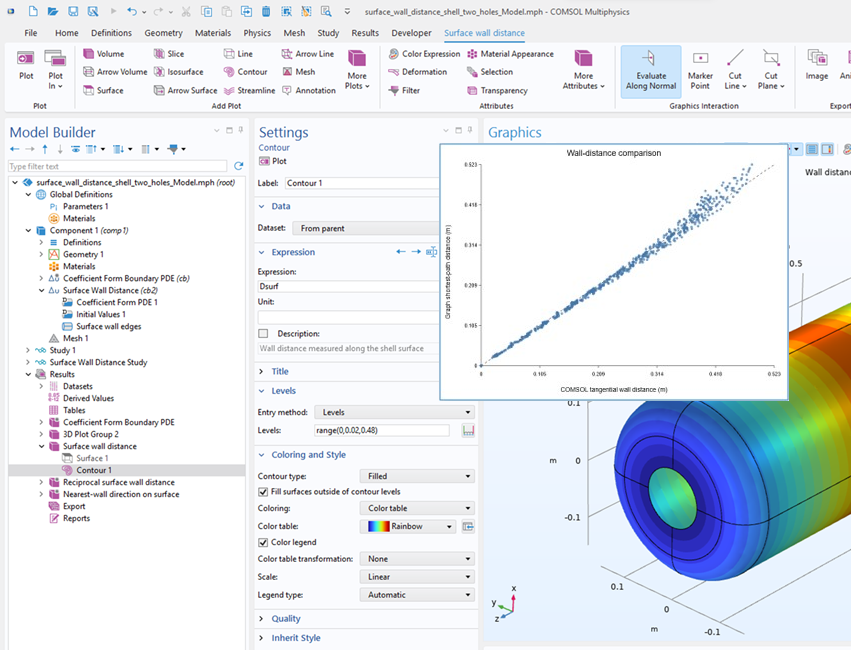 Setting up and solving an equation-based model from a single prompt.
How Can Cosmon’s AI Agent Help Simulation Engineers?
Rui Aguiar introduced Cosmon’s AI agent, “Nexus,” which engineers can use in tandem with the COMSOL Multiphysics® software to automate repetitive simulation tasks, including CAD preparation and geometry cleanup, simulation setup, solver troubleshooting, parametric sweeps, evaluation and visualization of results, and reporting directly in COMSOL Multiphysics®.
Although agents can operate with or without human input, Aguiar explained that Nexus is not intended to replace engineers’ expertise; instead, it uses a human-in-the-loop design and knows when to ask for the engineer’s input or approval.
Nexus can support engineers with capabilities that include interpreting natural language instructions, interacting with COMSOL Multiphysics® via the COMSOL API, intent-driven setup of materials and physics, running automated parametric studies, resolving common solver issues, and organizing results for review. Another common use case is recreating simulations from academic papers in COMSOL Multiphysics®; to see a detailed example, please refer to this Cosmon case study here.
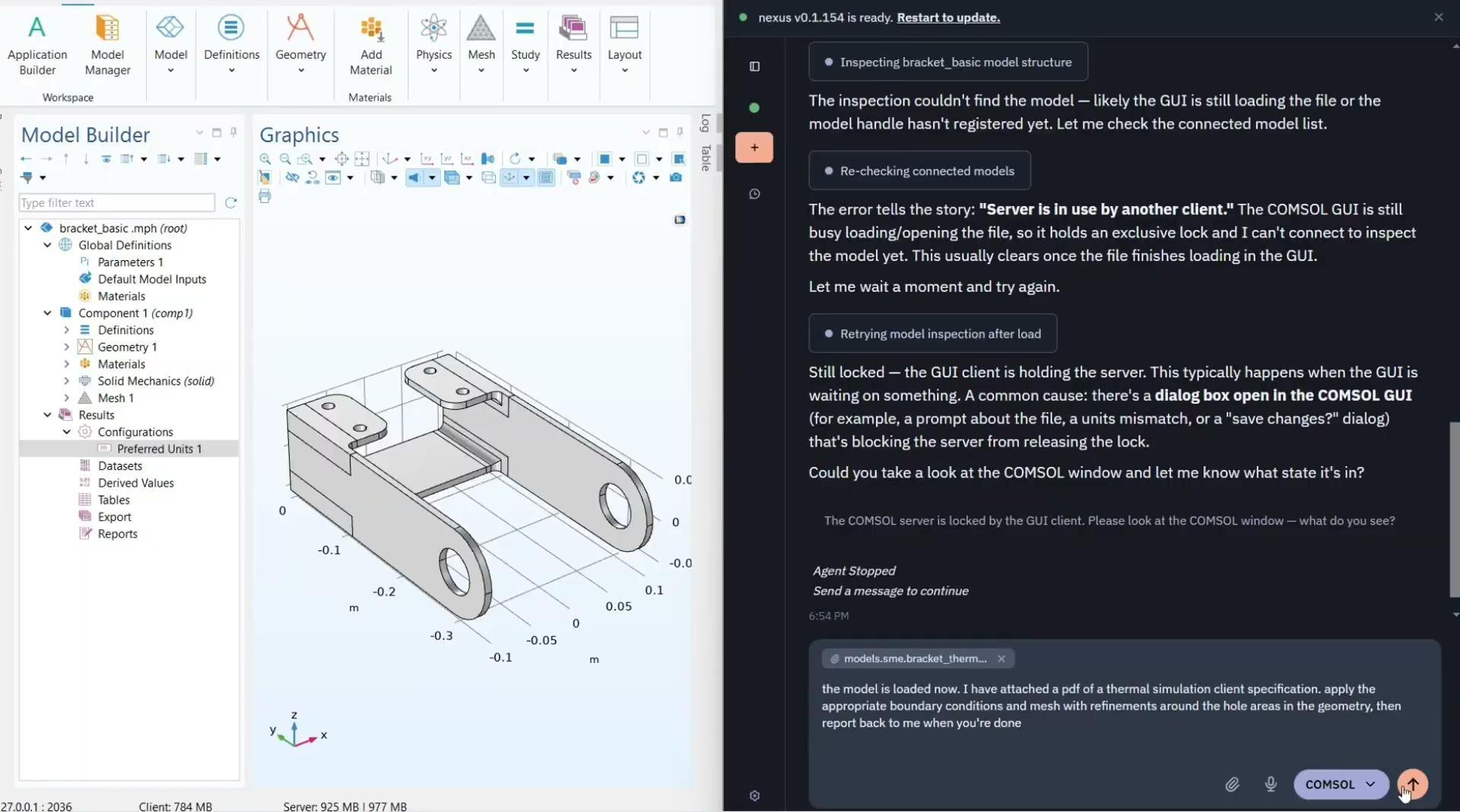 The Nexus window (right) assisting the engineer with setting up a thermal simulation according to attached specifications.
Aguiar emphasized that this new way of conducting simulation with agentic AI helps engineers spend less time on manual setup, debugging, and documentation. He also highlighted Nexus’s support for processes upstream and downstream of simulation, such as its capabilities for automated CAD translation and defeaturing and generation of charts and reports. With agentic support available at every point in the simulation workflow and beyond, engineers have more time to focus on higher-level decision-making, including physics and design decisions that require domain knowledge.
Getting into the Details
During a Q&A at the end of the webinar, Sjodin and Aguiar gave the following responses to attendee questions.
Does the Chatbot window in COMSOL Multiphysics® require a separate module or license?
“No,” Sjodin said. “The chatbot functionality is provided as part of the COMSOL Multiphysics® core package.” However, he went on to state that one requirement for enabling the Chatbot window is having your own API subscription with an AI provider or using an on-premise model. This can be established in the Preferences settings, where you input an API key.
Is the Cosmon AI agent a separate program?
The Cosmon AI agent is a separate software program that lives on your desktop. It can connect to an existing COMSOL license when both the Cosmon AI agent and Chatbot windows are open.
Why should I use an AI agent and not just use a chatbot?
According to Sjodin and Aguiar, there are a lot of reasons why one might opt to use a particular type of AI tool over another, and part of learning to utilize AI is knowing when certain AI technologies are better than others. They agreed that a chatbot is definitely useful, but an agent is often capable of more. A chatbot, they explained, is powerful enough and easy enough to use for a quick answer to an engineering or physics question; similarly, someone debugging code to input into the Java Shell window may also find a chatbot useful. However, if an engineer wants an AI tool to take on actions such as troubleshooting, fixing geometry, meshing, or plotting results, Sjodin and Aguiar agreed that using an AI agent would be a better choice.
They said if you’re looking to use an AI tool to perform a task such as creating an MPH file, you’ll need to use an AI agent because a chatbot typically doesn’t know the entire COMSOL API perfectly. “If there’s some iteration needed, you need to go the agent way,” Sjodin explained. Aguiar went on to mention the benefits of Nexus for iterative tasks. “A great thing about agents is that you can [train them to develop customized] skills that perform a workflow over and over,” said Aguiar. With the Cosmon agent, best practices and guidelines can be baked into a skill.
Can the Cosmon agent analyze assemblies?
According to Aguiar, yes. The agent can import assemblies from other software programs and perform actions on them. “Luckily, the COMSOL API is very comprehensive,” Aguiar stated. “Our agent has the ability to execute operations [such as geometry healing] over assemblies. We can do geometry healing or cleanup in COMSOL® natively or within a CAD model, and we can do it on a part or on the assembly level as well.”
How does an AI agent learn?
“Like many things in life, it depends,” said Aguiar. He talked about how you can set the agent to learn alongside the user based on what tasks it typically performs and gets human feedback on. However, most of this happens within a single user interface. When it comes to cross-team memory, the agent predominantly operates on a skill-file level. “For example, if you have a team of engineers and one engineer who knows how to run a specific type of simulation, and you want to share that knowledge with another team member, what you can do is create a skill file, say ‘This is how it’s run, and this is how it’s set up,’ and export that as a skill file for another engineer to load into their agent.” This functionality within Nexus is especially valuable to organizations and teams who wish to democratize simulation so that more engineering staff can run more simulations with the COMSOL Multiphysics® software.
The Future of Agentic AI
According to Aguiar, agentic AI is a rapidly advancing field. His studies have shown that Cosmon’s AI copilot for engineering, Nexus, has helped make simulation workflows — from setup and troubleshooting to evaluation and visualization of results — between two to three times faster, enabling users to spend less time on manual tasks such as meshing, adjusting parameters, and repairing or healing geometry. This extra time allows engineers to create more impactful simulations faster.
Aguiar explained that, as it works today, copilot tools require engineers to act as operators who configure most steps of the engineering and simulation process. In the future, Aguiar expects AI agents to design, simulate, analyze, and iterate autonomously, with engineers using human intuition and expertise to interpret and interrogate AI-generated conclusions.
Next Step
If you’re interested in watching the complete webinar, you can access it via the button below!
Further Resources
Interested in learning more about how to use AI tools in COMSOL Multiphysics® or the advancements of AI in the engineering space? Check out these additional resources on the COMSOL website:
DeepSeek is a trademark of Delson Group Inc. Google Gemini is a trademark of Google LLC. GPT-5 is a trademark of OpenAI OpCo, LLC. OpenAI is a trademark of OpenAI, Inc. Oracle and Java are registered trademarks of Oracle and/or its affiliates.





Comments (0)